


San Antonio Express-News
4.1247.00 Reviews
App Specs
- Version
- 202608.28
- Updated On
- License
- Free
- Downloads
- 10,000+
- Developer
- Hearst Newspapers - LLC
- Categories
- News & Magazines
- Platform
- Android
Screenshots






 Analysis by AppCompare
I judge a local news app less by how many headlines it can put on one screen and more by whether it helps me keep up with a place I care about without turning every spare minute into a news session. The San Antonio Express-News app is built around that local purpose. I’d consider it when I want San Antonio reporting within easy reach, rather than a broad national news feed where city coverage can get lost.
A practical routine for keeping up
My most useful approach to a local news app is to give it a regular place in the day. I might check the main feed over breakfast, open a story when a headline connects to something happening nearby, and return later only if I want more context. That routine suits this app’s focus better than treating it as an endless stream to scroll through.
For example, if I’m planning a day around San Antonio, I can use a quick visit to catch up on local developments, then set aside a longer stretch for a substantial report. The distinction matters: breaking updates are helpful for awareness, while a carefully reported article can explain why an issue affects residents. I’d use the feed for the first pass and read selectively when a story deserves more time.
The app is most relevant to residents, former residents, and people with family, work, or other ties to the area. Someone who follows local civic life may value a dedicated source more than a national app that gives San Antonio occasional attention. On the other hand, a visitor who only needs broad travel guidance or a reader interested mainly in international news may be better served by a different source.
Habits that make the experience more useful
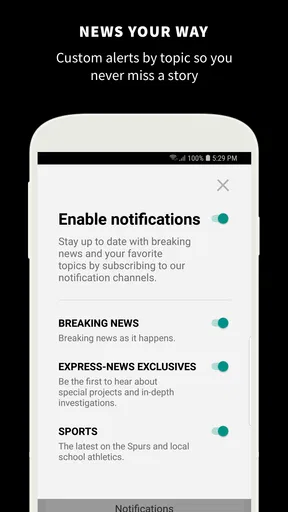
I’d be deliberate about notifications rather than letting every alert interrupt the day. Breaking-news prompts can be useful when I want immediate awareness, but frequent interruptions make it harder to distinguish an urgent development from something I can read later. A sensible habit is to keep alerts only if they genuinely help, then use the app itself for a calmer catch-up when convenient.
When I find an article I want to finish later, saving it for offline reading can turn a short idle moment into a useful reading window. I’d save longer pieces before leaving a reliable connection, then open them during a commute or while waiting somewhere. That is a practical use of the feature, not a reason to assume every part of the app works without a connection.
Another good habit is to move between topics with a question in mind. If I’m following a local issue, I can look beyond the first headline and read related coverage where available, rather than treating one short update as the whole story. That helps me separate an immediate development from the broader context, while keeping the session focused instead of hopping through unrelated stories.
Worth Reading Before You Choose

Flipboard Shows What News Apps Must Do Beyond the Feed

Switching to Android Auto Means Rethinking Your Driving Routine

Google Calendar Makes a Crowded Week Easier to Manage

Ludo King Makes the Most of the Minutes Between Plans

Baby Panda World Brings Quick Play to Modern Phones, but Its Game Library Feels Busy

ESPN’s Live Game View Makes Following Close Games Easier
What to check before relying on it
The app is free to install, but it includes in-app purchases priced from $5.99 to $14.99 per item. I’d check the terms shown in the app before assuming that every article or feature is included without a purchase. That distinction is worth keeping in mind if I’m comparing it with a general news app or planning to use it as my only source.
It comes from Hearst Newspapers - LLC and sits in the news and magazines category. Its average rating is 4.2 from around 590 ratings, with roughly 240 written reviews, and it has more than 10,000 installs. It is rated for Everyone, so its stated age classification is broad; as with any news source, the subject matter of individual stories can still be serious.
The app was released on October 10, 2018, and its current version is 202602.31, with Android 9 as the minimum operating system. If I were installing it on an older device, I’d check that system requirement first. That small check can save time and is more useful than assuming a news app will run on any phone simply because its interface looks lightweight.
Getting Started with San Antonio Express-News
First things first, downloading the San Antonio Express-News app is a breeze. Available on both iOS and Android, you can find it in the App Store or Google Play with just a quick search. Once installed, the app greets you with a clean, easy-to-navigate interface that’s perfect for diving into the latest news.
Setting up the app is straightforward. You can create an account or log in using existing credentials if you’ve subscribed before. The process is seamless, and you’re quickly directed to the main feed, where all the magic happens.
Exploring the Features
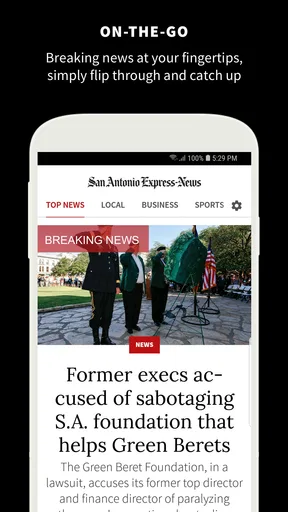
The app does a fantastic job of delivering localized content. You can browse through various categories like politics, sports, business, and entertainment. What I particularly love is the personalized news feature that tailors content based on your reading habits. It's like having your own digital butler who knows exactly what you’re interested in!
Another cool feature is the push notifications. These keep you updated with breaking news, ensuring you’re never out of the loop. It’s perfect for those moments when you need quick updates without diving deep into the app.
User Experience and Design
Let’s talk design. The app sports a minimalistic look that’s both appealing and functional. Articles load quickly, and the text is easy to read, which is a big plus for those long reading sessions. The option to save articles for offline reading is another thoughtful touch, especially when you’re on the go.
Navigation is intuitive, making it simple to hop from one section to another without any fuss. The app doesn’t bombard you with ads, which is a huge relief. It’s all about giving you the news, and it does that beautifully.
Why You’ll Love It
For anyone living in or interested in San Antonio, this app is a must-have. It offers a comprehensive view of the city’s happenings, from local politics to community events. Plus, the San Antonio Express-News app is regularly updated, so you’re always getting the freshest scoops.
One of the standout features is the in-depth investigative journalism. The app provides access to a wide range of articles that dive deep into serious local issues, offering a perspective that’s hard to find elsewhere.
Wrapping Up
In conclusion, the San Antonio Express-News app delivers exactly what you’d want from a news app: timely updates, a user-friendly interface, and a focus on local content. Whether you’re a voracious news reader or just someone who likes to stay informed, this app is a solid choice.
If you haven’t already, give it a download. It’s a great way to stay connected with everything happening in San Antonio, and who knows, it might just become your go-to source for all things news!
Where it fits among other news choices
A city-focused publication has a different job from a national aggregator. Aggregators are convenient when I want headlines from many places in one screen, but they can leave local reporting buried among unrelated stories. A dedicated San Antonio app gives local coverage the center of attention, which is a real advantage if the city is part of my everyday life. The trade-off is focus: readers who want a broad mix of regions and subjects may prefer to keep a general news source alongside it.
I’d also treat the app as one part of a well-informed routine, not a substitute for every kind of local information. For a developing story, I’d read the article carefully and look for later reporting before making decisions based on an early alert. For practical matters that require an immediate official answer, I’d still check the relevant local organization directly. News reporting helps explain events; it is not always the fastest route to a service update or personal guidance.
Small decisions that improve the routine
Personalization is most useful when it helps surface subjects I actually follow, but I wouldn’t let a tailored feed become my only view of the city. I’d periodically browse beyond my usual interests so that local coverage doesn’t narrow to a single topic. That is especially worthwhile for readers who mainly follow sports or politics: a brief look at other sections can reveal community reporting they might otherwise miss.
I’d also separate reading from alert-checking. A notification can tell me that something has happened, but I don’t need to make a judgment from the alert alone. Opening the full article when I have time gives me more context and reduces the chance of reacting to a fragment. If I’m busy, I can leave the deeper read for later rather than repeatedly reopening the same update throughout the day.
For a household or a group of friends with different interests, the app works best as a shared starting point rather than a complete personal briefing for everyone. One person may care about city decisions, another about sports, and someone else about neighborhood concerns. The categories make it easier to move toward a relevant subject, but each reader still needs to choose what deserves attention instead of expecting a single feed to anticipate every preference.
Who should choose another option
I would skip this as my primary news app if I rarely care about San Antonio or if I want a single place for extensive national and international coverage. Its local emphasis is the point, but that same emphasis limits its value for someone whose interests are elsewhere. In that case, a broad publisher or an aggregator is a more natural daily choice, with this app added only when a San Antonio story matters.
Likewise, readers who want every story available as part of a free experience should review the in-app purchase choices before settling into a routine. The free download makes it easy to try, but it does not mean every item necessarily comes without a charge. I’d decide based on the coverage I actually read rather than paying on the assumption that more access automatically means more value.
My overall take is that the app makes the most sense for people who want a repeatable, local-first way to follow San Antonio. I’d use it for a quick morning scan, save a substantial article for a quieter moment, and keep notifications limited to the updates I truly want delivered. Used that way, it is a focused companion to broader news sources—not a replacement for them—and its strongest reason to stay installed is the attention it gives to the city it covers.
Pros
- Comprehensive local news coverage.
- User-friendly interface and navigation.
- Regular updates keep content fresh.
- Customizable notifications for news alerts.
- Offline reading mode available.
Cons
- Some features behind a paywall.
- Occasional ad interruptions.
- Limited national news coverage.
- App can be slow to load at times.
- Requires a stable internet connection.
FAQs for San Antonio Express-News
What features does the San Antonio Express-News app offer?
The San Antonio Express-News app provides users with comprehensive local news coverage, including breaking news alerts, in-depth articles, and multimedia content. Users can enjoy a personalized news feed tailored to their interests and access to exclusive subscriber-only content. The app also allows offline reading and offers a user-friendly interface for easy navigation.
Is the San Antonio Express-News app available for free?
The app itself is free to download on both Android and iOS platforms. However, access to certain premium content and features may require a subscription. Users can browse some articles for free, but to unlock the full range of content, a subscription is necessary, offering various plans to suit different needs.
How do I manage notifications in the app?
Users can customize notifications by accessing the settings menu within the app. Here, you can choose which types of alerts you wish to receive, such as breaking news, sports updates, or entertainment news. This allows for a personalized experience, ensuring you only receive information that is relevant and important to you.
Can I share articles from the San Antonio Express-News app?
Yes, the app makes it easy to share articles with friends and family. You can share content via email, social media platforms, or messaging apps directly from within the app. Simply tap the share icon on any article to select your preferred sharing method and spread the news effortlessly.
Does the app offer offline reading capabilities?
The San Antonio Express-News app supports offline reading, which is perfect for users on the go. You can save articles to read later without an internet connection. This feature ensures you have access to important information and stories even when you're in areas with limited connectivity.


